
iCloudWatch icon

iCloudWatch

See what iCloud Drive is actually doing.

Dropbox has one. OneDrive has one. iCloud Drive syncs your most important files with no visible status at all. iCloudWatch puts the missing indicator in your menu bar — so you know your files made it before you close the lid.

Version 2026.1.0, released 9 September 2026

Runs entirely on your Mac. It reads your local iCloud sync status and never sends it anywhere; the only connection it makes is a daily update check against this site.
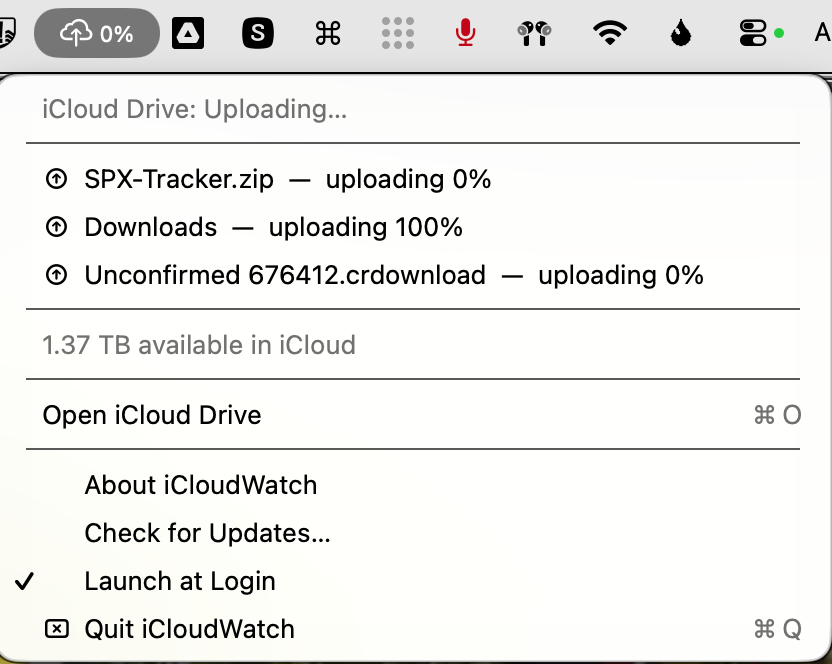
The iCloudWatch menu open in the macOS menu bar, listing three files currently uploading with progress percentages, the storage remaining in iCloud, and an Open iCloud Drive shortcut.

Everything iCloud Drive is doing right now, one click from the menu bar.

Status at a glance.

A plain cloud when everything is synced. An arrow while uploading or downloading. An exclamation mark when a transfer has stalled or the sync daemon reports an error or conflict — the states macOS keeps to itself.

The details, one click down.

Files currently transferring with progress percentages, recent activity with relative timestamps, any sync issues, and your remaining iCloud storage. Click any file to reveal it in Finder.

Catches the silent stalls.

iCloud's worst habit is stopping without telling you. iCloudWatch flags any transfer that hasn't moved in five minutes, so a stuck upload never masquerades as a finished one.

The fine print