Coming soon

fnMute isn’t on sale yet. A free, time-limited beta is available to try today. Email us and we’ll let you know when it ships.

fnMute icon

fnMute

Just fn mute already.

One key. Instant silence. fnMute drops your mic the moment you need it — mid‑sneeze, mid‑rant, mid‑“why is the dog like this.” Tap to mute, tap to come back. No hunting for the right window, no clicking through menus, no hot‑mic horror stories.

$5 when it ships · Requires macOS 13 or later · Windows version coming soon · Current beta 0.2.0‑beta.1, 28 August 2026

Runs entirely on your Mac. The only connections it makes are a daily update check and a license check, both against this site.
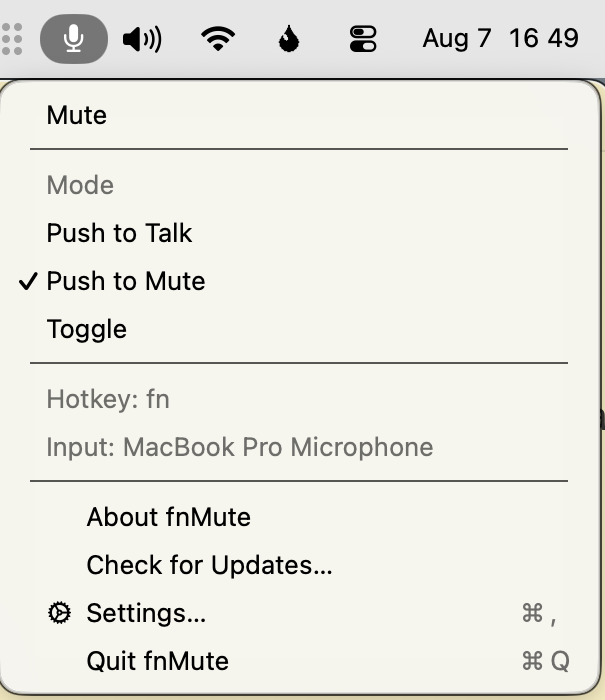
The fnMute menu open in the macOS menu bar, with a Mute command, the Push to Talk, Push to Mute and Toggle modes with Push to Mute selected, and the current hotkey and input device listed below them.

Pick your mode, see your hotkey and input device, and get on with the call.

Push‑to‑talk or push‑to‑hush — your call.

Hold your key to talk and release to go quiet, or tap once to toggle. However your brain works, fnMute keeps up.

Always knows if you're live.

A clean menu‑bar indicator tells you at a glance whether the world can hear you. Green means go, red means they can't hear you complain about the meeting.

Works everywhere.

Zoom, Meet, Slack huddles, Discord, that one app nobody likes — fnMute mutes at the system level, so it doesn't care what you're talking into.

Three modes, one key

Pick the muting style that fits how you talk.

Push to Talk

Your mic stays muted; hold your hotkey to talk.

Push to Mute

Your mic stays live; hold your hotkey to mute — cough, sneeze, side conversation.

Toggle

Tap your hotkey to flip mute on or off and stay there.

How it works

  1. 1

    You'll buy a license.

    Not yet — but when it ships, come on: it's only five fn bucks!

  2. 2

    Pick your fn key.

    Choose your fn mute shortcut and make it yours — a regular key, a modifier combo, or a bare modifier. The default is the fn key itself.

  3. 3

    Mute like you mean it.

    Tap, hold, whatever — you're in control.

  4. 4

    Get on with your fn day.

    That's it. That's the app.

The fine print (the good kind)